
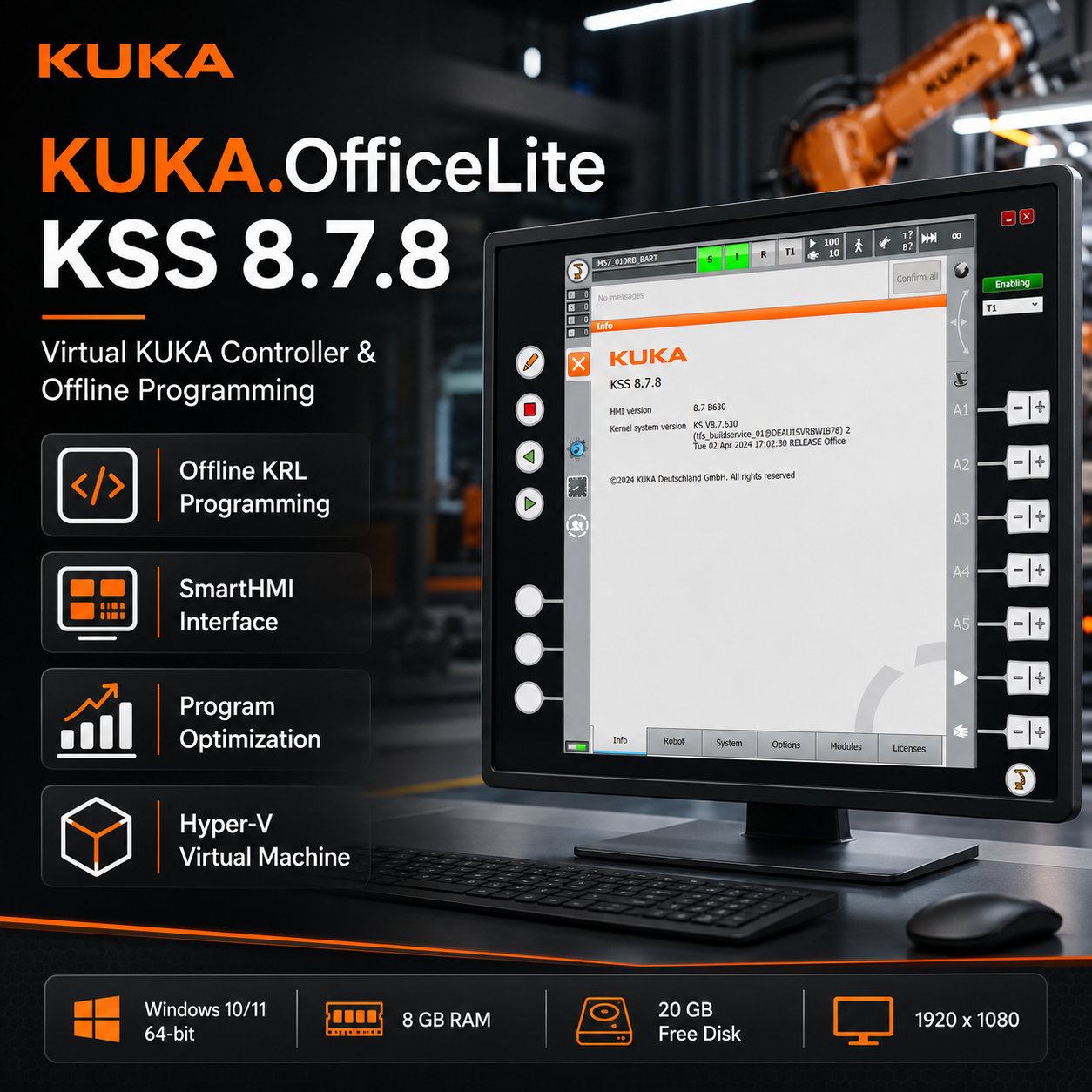
KUKA.OfficeLite KSS 8.7.8
Original price was: $ 300,00.$ 230,00Current price is: $ 230,00.
Description
KUKA.OfficeLite KSS 8.7.8 is a virtual KUKA robot controller designed for offline KRL programming, application development, training, and program optimization on a standard Windows computer.
The software provides an environment that closely reproduces the operation of a physical KUKA robot controller. Using the familiar KUKA smartHMI interface and native KUKA Robot Language (KRL) syntax, users can create, edit, test, and optimize robot programs without occupying a production robot or interrupting manufacturing operations.
Once validated, compatible KRL programs can be transferred to the appropriate KUKA robot controller, helping reduce commissioning time and accelerate deployment on the shop floor.
Main Features of KUKA.OfficeLite
- Virtual KUKA robot-controller environment
- Offline creation and editing of KRL robot programs
- Original KUKA smartHMI-style operating interface
- KRL syntax verification using the available compiler and interpreter
- Creation of executable KRL user programs
- Program testing and optimization on a standard PC
- Simulation of digital input signals
- Evaluation of program responses to simulated signals
- Support for robot-program development without stopping production
- Virtualized installation using Microsoft Hyper-V
- Compatibility with supported KUKA.WorkVisual configurations
- Ability to install compatible OfficeLite versions in separate virtual environments
Offline KUKA Robot Programming
KUKA.OfficeLite allows programmers to work on robot programs away from the physical robot cell. Engineers can prepare and review KRL code, verify syntax, simulate selected controller behavior, and optimize program logic before transferring the project to a compatible robot controller.
This offline workflow can help reduce the amount of programming performed directly on production equipment.
Key Benefits
- Reduce robot downtime during program development
- Prepare KRL programs before commissioning
- Detect syntax and logic issues earlier
- Improve robot-program organization
- Support faster deployment of production changes
- Create a repeatable training environment
- Develop applications without requiring continuous access to a physical robot
- Maintain separate virtual installations for different supported configurations
KUKA smartHMI and KRL Environment
The virtual controller uses an interface and programming workflow designed to closely reflect supported KUKA controller environments.
Programmers familiar with KUKA robots can work with:
- KUKA Robot Language syntax
- Program modules and data files
- Robot variables and system structures
- Digital input-signal simulation
- Program execution and testing tools
- Controller-style navigation and program management
Because the environment resembles the robot-controller workflow, programs can be developed in a familiar setting before being introduced to compatible production equipment.
Typical Uses
KUKA.OfficeLite can be used for several robotics and automation activities, including:
- KUKA robotics training
- KRL programming practice
- Robot-application development
- Program maintenance and optimization
- Preparation of production updates
- Testing selected program reactions
- KUKA.WorkVisual-related engineering workflows
- Education and technical demonstrations
- Offline development before robot commissioning
Virtual Machine Operation
KUKA.OfficeLite KSS 8.7.8 operates in a virtualized environment. This helps keep the installation separated from the main Windows operating system and allows supported versions to be maintained independently.
Microsoft Hyper-V must be enabled and correctly configured before using the supplied virtual-machine image.
Virtualization performance depends on the computer processor, available memory, storage speed, BIOS settings, and Windows configuration.
Digital Product Delivery
This is a digital product. Download instructions and access information are sent to the email address provided during checkout.
Customers should confirm that the email address entered during purchase is correct. A stable internet connection and sufficient storage capacity are required to download and extract the supplied files.
Minimum System Requirements
The computer should meet or exceed the following requirements:
- Operating system: Windows 10 Professional or Windows 11 Professional, 64-bit
- Processor: Intel Core i5, equivalent AMD processor, or better
- Processor speed: 2.5 GHz or faster
- CPU cores: Four cores or more recommended
- Memory: At least 8 GB of available RAM
- Storage: At least 20 GB of available disk space
- Display resolution: 1920 × 1080 or higher
- Virtualization: Hardware virtualization enabled in BIOS or UEFI
- Hyper-V: Must be enabled in Windows
- Engineering software: KUKA.WorkVisual 6.0 or later, when required for the intended workflow
- Internet connection: Required for downloading the installation package
For smoother virtual-machine operation, 16 GB or more of total system memory, an SSD, and a modern multi-core processor are recommended.
Package Contents
The supplied package may include:
- KUKA.OfficeLite KSS 8.7.8 virtual-machine files
- Hyper-V virtual-machine image
- Installation and configuration instructions
- Hyper-V activation guidance
- KUKA.OfficeLite startup instructions
- Supporting installation material
- Technical guidance for initial configuration
The exact files, modules, language options, and compatibility depend on the product package and license supplied.
Compatibility Notice
Before purchasing, customers should verify compatibility with their intended:
- KUKA robot-controller generation
- KUKA System Software version
- KUKA.WorkVisual version
- KRL project
- Windows edition
- Hyper-V configuration
- Computer hardware
KUKA.OfficeLite does not replace all functions of a physical robot controller. Hardware connections, real robot motion, fieldbus devices, safety hardware, and physical peripheral behavior may not be available in the virtual environment.
Technical Support
Installation guidance is available for customers who require assistance with:
- Enabling virtualization
- Activating Hyper-V
- Importing the virtual-machine image
- Configuring memory and processor resources
- Starting KUKA.OfficeLite
- Preparing a compatible KUKA.WorkVisual environment
Related products
-
Sale!
-
Sale!
-
Sale!
-
Sale!
Mitsubishi GX Works3 v1.03Q & GX Works2 v1.560J
Original price was: $ 110,00.$ 90,00Current price is: $ 90,00.
Reviews
There are no reviews yet.